For tradies, NDIS providers and anyone who runs their own show

Quote it, book it and invoice it, all from your phone.

Walk the job and say it out loud, and Kel writes the quote. Then book it, invoice it and get paid, all while you're on the tools.

Start your free month
First month free. No card to start. Join in 2026 and keep $29.95 a month for as long as you stay.
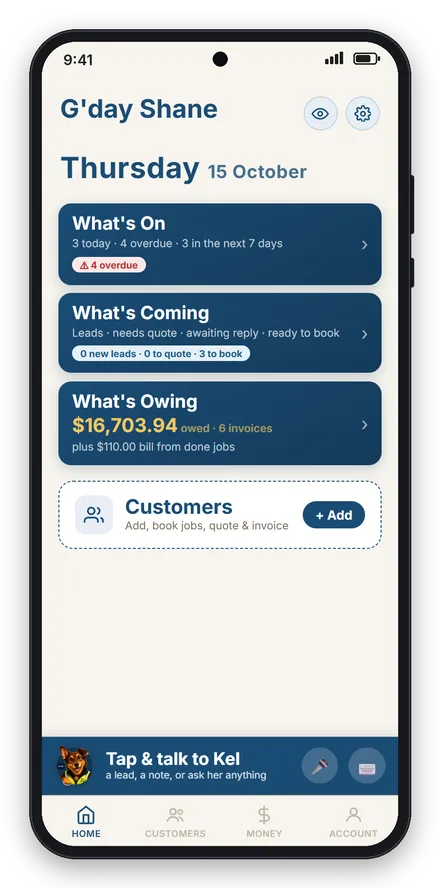
The Its All Sorted home screen: what's on today, what's coming, and what's owing Asking Kel who owes money and getting a list with the total
"Eight NDIS invoices sent in under a minute. My plan manager said they're exactly what they need, better than what my old software gave them."
Matt, Outstanding Gardening, Canberra. Using it on real jobs every week.

App screens show our demo business, Shane's Maintenance & Building. The customers and figures are made up. Matt's quote is real.

New: talk it in

Walk the job, say it out loud, and the quote's written.

Tap the red dot and talk like you're telling your offsider what needs doing. How many hours, what rate, what's included. Kel turns it into a proper quote: the customer, the address, every line and the price.

You check it and send it. Nothing goes to the customer until you say so.

  • Hours, metres, materials and your offsider's charge-out rate
  • Say "one price" and the customer sees one tidy total, or keep the breakdown
  • Kel fills in the customer and the address from what you said
  • GST added for you, and your logo on the quote
Included in your $29.95. No add-on.
1

Tap the red dot

The Talk it in button at the top of a new quote
2

Say it how you'd say it

On site, out loud"Three hours mowing, an hour edging, three hours hedging, eighty five an hour. Rubbish removal two hundred. Green waste included. Make it one price plus GST. I'm at 12 Wattle Street, Kambah for Sam Taylor."
3

The quote's done

The finished quote for Sam Taylor: mow, edge, hedge and rubbish removal, $874.50 including GST
My prices

Your rates, already in.

Put your usual rates in once: per hour, per day, per metre, per square metre or per item. Then say the size of the job and Kel writes the quote at your prices.

  • Labour and materials come out as separate lines, so the customer sees what they're paying for
  • Say "25 square metres of paving" and the maths is done
  • Typing a quote instead? Your price pops up as you type the item
  • Change a rate once and every new quote uses it

Rates shown are examples. You set your own.

My prices screen with paving labour, paving materials, road base and rubbish removal ratesBack patio paving quote for Brent Hall: road base, paving materials and paving labour at set rates, $3,575 including GST
Quoting a crew

Four blokes for ten hours is one line.

Put a line in the way you'd say it out loud. How many people, how many hours, what rate. It adds itself up as you go.

Your customer gets a clean PDF with your logo that shows exactly what they're paying for, and an Accept button right in the email.

  • People times hours, days, metres or square metres
  • GST added on top, or included, your call
  • They tap Accept and you know straight away
  • Quiet quotes get flagged so none go cold on you
Quote builder showing Carpenter, 2 people times 16 hours at $75 The quote PDF the customer receives, total $6,578
Getting paid

Tap done when the job's finished, then get paid.

Finish the job and tap done. Paid on the spot, invoice it now, or sort it later. One question, and your books stay right.

  • Cash jobs still count as income, no invoice needed
  • Every invoice tracked: paid, part paid, or still sitting there
  • Overdue ones go red, and a reminder is one tap
  • Email it, or send it by text or WhatsApp
Job done: paid on the spot, invoice it now, or sort it later An overdue invoice showing $8,820 still owing with a Send reminder button
Chasing, sorted

Kel does the chasing. You skip the awkward chat.

Quotes that go quiet and invoices that go overdue never slip through. Kel tells you who to chase, with their number ready to ring or text. Or tap once and she sends a friendly reminder from your business name.

  • Quotes with no answer flagged at 3, 7 and 14 days
  • Invoices flagged once they're 3 days overdue, then every week
  • Customer keeps opening your quote? Kel tells you to ring, that one's keen
  • Switch on Kel chases for me and the reminders go out at 9am on weekdays
  • Replies come straight to you, and NDIS invoices are never chased automatically
Kel showing three quotes to chase up, with Ring, Text and Send reminder buttonsThe friendly reminder email a customer gets about their quote, from the tradie's business name
NDIS providers

A job app that actually gets NDIS.

Most job apps weren't built for NDIS work, so providers end up fighting them. Its All Sorted was built for it. The plan manager gets billed, the participant's details are on every invoice, and it's GST-free without you touching a thing.

  • Hours times your rate, billed to the plan manager, care of the participant
  • Participant number and NDIS support item code on every invoice
  • Participant changes plan manager? Change it once and every invoice after follows
  • Tell Kel "book all my NDIS clients in Monday" and she sets it up for you to OK

Matt sends his NDIS invoices in under a minute, and his plan manager says they're exactly what they need.

An NDIS invoice billed care of the plan manager, with the participant number, NDIS item code and GST Free

Not NDIS? Same idea for agents, builders and private jobs.

The job happens at one place but the invoice goes somewhere else. The account sits up top with every job underneath, each one billed the way it needs to be.

Real estate

Each property saved under the agency. Quote and invoice the agent, the address shows on the job.

Trade accounts

Builders, pool companies, strata. One account, lots of jobs, all billed to the right place.

Private

Just you and the homeowner. Quote, do the job, invoice, done.

Tax time

Tax time, sorted as you go. One tap for your accountant.

Everything you earn and everything you spend is recorded while you work: paid invoices, cash jobs, receipts and subbie payments. At tax time your accountant gets the lot in one tap.

Miss your TPAR and the ATO can fine you, and the fine keeps growing the longer it's late. Most sole traders don't know it exists until the letter turns up.

  • Your income: every paid invoice and cash job, with the GST you collected
  • GST collected against GST paid, by month, quarter or year, ready for your BAS
  • Profit and loss, income, expenses and TPAR, exported for any period
  • TPAR: one line per subbie with their ABN, and missing ABNs flagged
Subbies screen: $5,280 paid out this financial year to 3 subbies, with Export TPAR for accountant The TPAR summary report: one line per subcontractor with ABN, total $5,280
Receipts

Snap the receipt, then chuck it out.

Point your phone at the receipt. Kel reads the store, the amount and the GST, and files it. Every receipt you keep is money back at tax time.

  • Spent this month, right at the top of Money
  • Sorted by BAS quarter, export any period
  • Attach a receipt to a job and see your real profit on it
Expenses screen: $3,838.07 spent this month from 10 receipts, with Snap a Receipt
For accountants and bookkeepers

Your clients' numbers, done before they walk in the door.

Got sole trader and tradie clients who turn up with a shoebox? Put them on Its All Sorted. Their income, receipts and subbie payments are recorded as they go, GST and ABNs and all.

At the end of the quarter or the year it's one tap for them: profit and loss, income, expenses, GST and the TPAR summary, ready for you. No chasing, no shoebox.

Talk to us about your clients
Income and GSTEvery paid invoice and cash job, GST collected against GST paid, by quarter.
TPAR summaryOne line per payee with ABN, payments, gross and GST. Missing ABNs flagged before lodging.
Expenses by BAS quarterStore, amount and GST on every receipt, export any period.
Clean invoicesNumbered, GST shown properly, part payments tracked.
Meet Kel

You don't need a manual. Just ask Kel.

Kel's your offsider in the app. Talk or type to her like you'd talk to whoever does your books. Who owes me? What's on today? Book Dave in for Friday. She looks it up, or sets it up for you to OK.

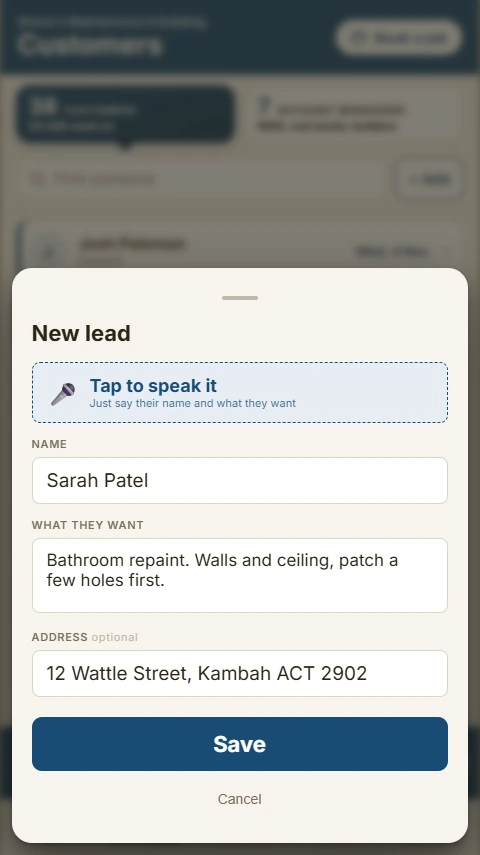
  • Pull over, tap the mic, say the lead. She files it
  • Knows which screen you're on and what you're looking at
  • Nudges you when a job's ready to invoice or a quote's gone quiet
Kel's welcome screen: G'day! I'm Kel. Welcome to Its All Sorted. Kel showing you round the home screen
Your day

Your whole day on one screen.

Open the app and it's all there. What's on today, what's coming up, and what you're owed. Tap a job and everything you'd do with it is right there.

  • One tap to mark it done
  • Reschedule, duplicate, or make it a regular job
  • Photos, receipts and notes kept with the job
Today's jobs list A job card with one Mark it done button
Try before you trust it

Have a go first. You can't stuff anything up.

There's a practice side to the app. Same app, but nothing in there is real. Kel will walk you through a job from start to invoice, then you're ready to do it for real.

Kel offering to take you through a practice job

It's all in the one app.

Use one part or all of it. They all talk to each other.

Leads

Say it to Kel or type it in. Nothing slips.

Quotes

Talk it in or type it. Crew pricing, Accept in the email.

Schedule

Your run sheet. Won jobs land ready to book.

Invoices

NDIS, real estate, trade accounts and private.

Receipts

Snap it. Kel reads the store, amount and GST.

Subbies

Payments kept with their ABN, ready for your TPAR.

Reports

Income, expenses, GST for your BAS and TPAR, one tap for your accountant.

Job profit

What came in, what it cost, what you made.

One price and you're sorted.

Less than $7.50 a week. One decent job pays for the year.

$29.95/month
First month free. No card to start. Cancel any time.
Join in 2026 and keep $29.95 a month for as long as you stay. Prices go up for new customers in 2027.
  • Quotes you can talk in at your own rates, with crew pricing and online Accept
  • Invoicing for NDIS, real estate, trade and private
  • Kel chases quiet quotes and late payers for you
  • Kel, by voice or text
  • Schedule and daily run sheet
  • Receipt scanning and job profit
  • Subbies and TPAR, reports for BAS
  • Your logo on every quote and invoice
Start your free month
Kel celebrating

Ready to get sorted?

Built by someone who did all this by hand, not a software company guessing what tradies need.

Start your free month